 ERP
ERPProduct / Walkthrough
See the work.
Follow the money.
A short, ungated look at a real Spona demo: from a sales quote to its invoice, remaining balance and the optional financing process.
Actual product screens · Demonstration data · Example names and amounts. Some records use Croatian business terms.
Sales / Offers
Start with a clear scope and price.
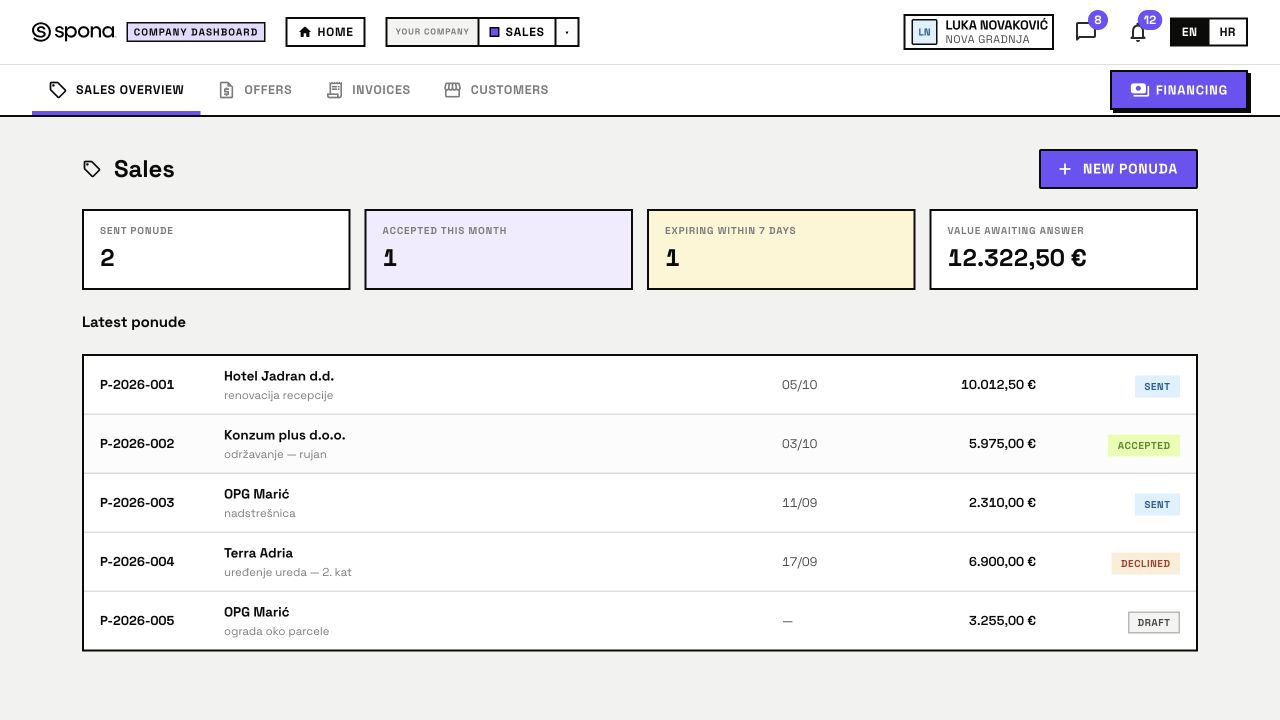
Prepare a quote with the client, line items and validity date. The Sales overview distinguishes drafts, sent quotes and accepted work, so your team can see which answer is still missing.
In this demo, quote P-2026-002 is accepted. The client can open a quote using its dedicated link without signing into the ERP.
WHEN DELIVERY HAS STAGES
Bring the work behind the invoice into view.
For staged services, use Work to organise scope, dates, tasks and delivery evidence. Request client confirmation for a completed stage. Keep the commercial record and delivery record consistent; this tour does not imply automatic conversion between every module.
Explore Work →- 01Agree the stage
- 02Complete and document delivery
- 03Request client confirmation
- 04Explore financing where eligible
Earlier payment—or more time to pay.
You delivered the service and your client owes you money. An eligible outstanding receivable may support a request for earlier payment. In the invoice demo, €3,975 remains unpaid; the paid €2,000 is separate. Pricing and acceptance require review.